
01
Give customers room to correct
Allow supported request details to be updated without an additional back-and-forth for each small change.
The little details change. That shouldn't slow everyone down. Give people a simpler way to edit supported Jira Service Management requests—while your rules stay in charge.
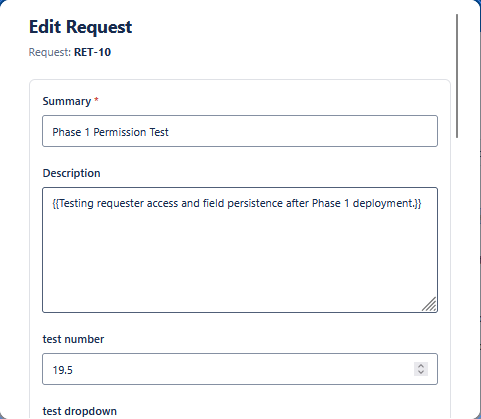
Customers have details to fix. Teams have guardrails to maintain. Shurivo brings those needs together.
Even a small correction can turn into another round of messages.
Eligible changes can happen in Jira, with configured rules and permissions.
Shurivo is designed around a simple principle: people should be able to make the right changes, within the right boundaries.
Allow supported request details to be updated without an additional back-and-forth for each small change.
Set project boundaries, eligible request types and fields using admin controls.
Keep editing decisions tied to access permissions and request conditions.
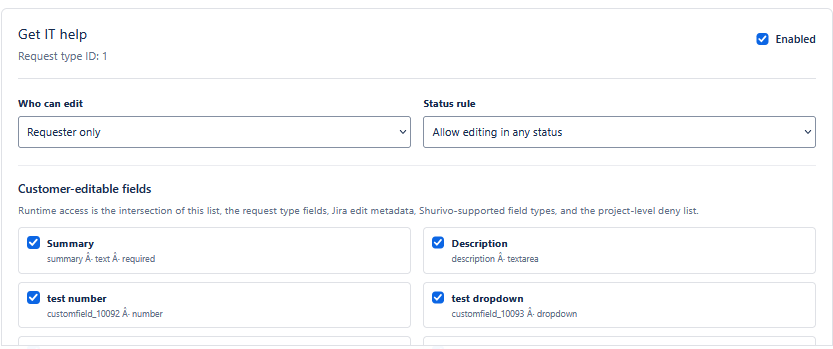
Shurivo connects project-level editing policies and request-type settings with a focused customer-facing editing experience.
Three steps keep the product easy to understand—without pretending every request should be freely editable.
Choose supported request types, editable fields and editing rules.
Access and relevant request conditions are checked when an edit is attempted.
Allowed changes are written to the original request in Jira.
Shurivo runs on Atlassian Forge. Permitted request updates are saved inside Jira, while project settings use Forge-hosted storage. The app does not operate a separate customer-data database.
Read the Trust CenterThe important things to know before exploring Shurivo.
Only supported fields enabled by the relevant project and request-type configuration. Availability depends on permissions and request conditions.
No. The documented editing workflow considers configured rules, authorization and request context before proceeding.
Project evidence covers text, number, dropdown, radio, multi-select, checkbox, date, date-time and label fields. Behavior can vary with Jira configuration.
Shurivo is built on Atlassian Forge. Request updates are saved in Jira and app configuration uses Forge-hosted storage. See the published legal and security documents for details.
Have questions about request-editing workflows or want a closer product walkthrough?